Showing posts with label software engineering. Show all posts

Tuesday, December 3, 2024

Simulation variable names

In simulation, you have to be precise when talking about a parameter. For example, it is never enough to say "height". You should always say "height with respect to mean sea level, with units in feet". The reason is that height can also be measured from WGS84 ellipsoid or ground (AGL). Every couple of months, I see engineers waste days, sometimes weeks, due to such misunderstandings.

Here is a list that I frequently encounter, with bad and good variable naming:
  • height: h - hMSL_ft (height measured from MSL, units in feet)
  • time: t - timeFreeFlight_s (time started at free flight start, units in seconds)
  • time: currentTime - currentTime_UnixEpoch_s (time started at Unix epoch, units in seconds)
  • date: currentDate - currentDate_UTC (date in UTC)
  • velocity: v - v_bc_Fn_mps (velocity of body fixed frame Fb wrt ground fixed frame Fc, with components expressed in NED frame, units in m/s)
  • speed: v - speed_Mach
  • acceleration: a - a_bi_noG_Fb_mps2 (acceleration of Fb wrt inertial frame Fi, without gravity components, expressed in Fb, units in m/s^2)
  • Euler angles: euler - euler_Fn2FbRFB321_rpy_rad (321 yaw pitch roll sequence rotated frame based Euler angles that convert a vector in Fn to a vector in Fb, array index order is roll pitch yaw, units in radians)
  • Azimuth: az - azimuthTrueNorth_deg (azimuth angle measured from True North, units in degrees)

Thursday, October 31, 2024

Handling long operations in observer chains

If you have lengthy observer notification chains where observers notify other observers, making the trigger order unpredictable, and these chains include time-consuming operations like updating a map drawing, you can use the following approach to only update the drawing when the last observer in the chain is reached:

Sunday, September 22, 2024

Using code from Simulink model in HIL

Steps of converting a Simulink model to code usable in Hardware-in-the-loop (HIL) simulation:
  1. Checkout/pull Simulink model from repository to your local.
  2. Run Simulink model and confirm it finishes as expected. If not, inform the model maintainer and ask them to commit/push the model with correct settings to repo. 
  3. Confirm that C/C++ code can be generated from model. Sometimes an s-function build file (mexw64) exists but its source code is missing, which allows the model to run but prevents code generation.
  4. Copy code to Visual Studio and verify that you can build and run it. There are cases where Simulink is more forgiving of errors like uninitialized variables, or missing #include <cmath> but Visual Studio cannot build the code.
  5. Copy code to real time Linux PC and verify code can be build there too.
  6. Commit code to its own repo.
  7. Run HIL with new code and verify HIL works as expected.

Monday, September 9, 2024

Why is file hash comparison faster than byte-wise comparison

Question: Since calculating the hash of a file requires reading every byte, why is comparing hashes of two files faster than byte wise comparison of file contents?

Answer: In hash comparison, each file's hash is computed once (by reading all its bytes), and then the two hashes, which are small fixed-size values (e.g., 256-bit or 512-bit), are compared. Comparing two hashes takes constant time, regardless of file size. In a byte-wise comparison, if there are N bytes, in the worst case where files are the same, N comparisons have to be made. 
  • Hash comparison = reading file + 1 comparison.
  • Byte-wise comparison = reading file + N comparisons.

Tuesday, March 26, 2024

When do you need HIL tests?

The steps to create an autonomous aircraft, from design to product, are as follows:
  1. Concept of Operation
  2. Requirements
  3. Design
  4. Ground tests
    1. Test components
    2. Test system
  5. Flight tests
  6. Deployment
  7. Maintenance/Updates
As you progress through these steps, the cost of fixing problems increases exponentially.

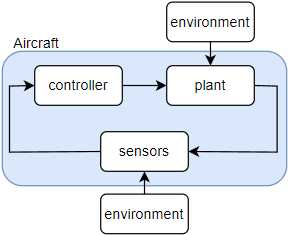
Consider a typical closed-loop diagram:
The "plant" consists of the airframe, actuators, and engine. The environment includes the atmosphere, aerodynamics, gravity, and electromagnetic interference.

During design phase, you start without any hardware and simulate everything with software-in-the-loop (SIL) simulations. The advantage of SIL is that it allows you to run millions of automated tests in a short time and with low cost to verify that you don't have any logic errors in your software. 

As hardware becomes available, you proceed to ground tests, transitioning more and more of your software from standard PCs to custom hardware. This slower and more costly step is called hardware-in-the-loop (HIL/HWIL) tests. HIL tests are necessary because:
  1. Your system might work in SIL but since certain bugs only manifest themselves on a particular OS - compiler - hardware configuration, you cannot be sure with just SIL tests that your software is bug-free. Note: Instead of bug-free, the term 'tolerable' might be more appropriate because, for complex software, it is statistically improbable to achieve an entirely bug-free state.
  2. Resource constraints (memory, processing power, network speed, etc.) of real hardware might differ from those in SIL which might cause a working system in SIL to fail in HIL due to missed timings etc.
  3. Electromagnetic conditions (interference, noise, etc.) might differ from those in SIL. Components that work individually in isolation might cause problems when integrated together.
  4. Although you can't test as extensively as with SIL, you can still conduct far more tests than with flight tests.

Friday, January 19, 2024

The curse of band-aid solutions

The flexibility inherent in software development can become a curse because it allows developers to implement quick and dirty fixes without fully understanding the root cause of a problem. Suppose you are tasked with writing a factorial function, knowing that factorial(1) = 1 and factorial(2) = 2. You write a function to satisfy these conditions:
double factorial(size_t a) {
    return a;
}
Then, during live tests, you realize that the function should return 6 for an input of 3, and 24 for an input of 4. Instead of investigating the correct mathematical approach, you modify your code by adding if statements, because that is what you know:
double factorial(size_t a) {
    if (a < 3) return a;
    else if (a < 4) return a*(a-1);
    else return a*(a-1)*(a-2);
}
You add new if conditions as failed tests pile up. For such a simple case, all developers agree that this is not the way to go. However, as problems become more complex, they often lack straightforward solutions that a single line prompt to ChatGPT can provide. Also, there is always pressure to get things done quickly and you don't have time to get to the bottom of things. Most engineers yield under pressure which over time leads to a growing mess, dissatisfaction, burnout and resignation.
The optimum strategy is to use a band-aid solution in the short term, make a note of it (preferably in an issue tracking system), and as soon as you get a chance, spend time on how your solution could fail and make it more robust. It is crucial to be interested in the problem rather than merely viewing it as something to be gotten rid of. You never attain perfection, you approach it asymptotically. Those who are curious and have the discipline to conduct thorough root cause analysis will become 100X engineers. Those who don't will be replaced by AI. 

Thursday, December 28, 2023

The unbearable lightness of C

We have a Simulink project from which I generate C code to use in a Visual Studio C++ project. The Simulink project works fine, I can build the C code without any errors, but when I ran the C executable, I got an access violation error due to trying to write to address 0x0. The C project was working fine for previous versions. 

I initially identified the revision where this error first appeared. I reviewed the changed code and couldn't find anything wrong.

After a week of debugging I found out that it was due to an off-by-one error; An array was defined with size 47 using Simulink function ssSetNumDiscState(S, 47) in mdlInitializeSizes(...), but later in function mdlInitializeConditions(...), a for loop with upper bound of 48 was executed which resulted in writing to the memory adjacent to the allocated section for that array. 
static void mdlInitializeConditions(SimStruct *S) {
    real_T *states = ssGetRealDiscStates(S);
    for (int i=0; i < 48; i++) {
    	*(states + i) = 0;
    }
}
It has nothing to do with the latest change in the sense that it was not related to the logic of the change. Instead, that change altered the memory mapping of the build, putting another array (TUBufferPtr) after the first and the overflow caused the value at TUBufferPtr[0] to become 0x0 (NULL). When the program tried to write to the address represented by TUBufferPtr[0], it naturally caused an access violation because writing to address 0x0 is not allowed.
When I looked at the repository history, I saw that this error was introduced 3 years ago and for all these years, it did not become visible! The access violation only occurred when other unrelated code updates caused the compiler to arrange memory slightly differently.

This is also one of the reasons why sometimes C programs behave differently between debug and release builds or on different versions (service packs) of the same operating system. That discrepancy is an indication of an error hiding somewhere in your program. Another way such an error can become visible is when you have it in your C++ DLL that you call from your Java program. One day you update your JDK and your program crashes because DLL and JVM share the same memory space. Naturally, your first inclination is to blame the JDK update but in reality there is a buffer overflow in your DLL code.

You can never say for sure that modifying a code in module A won't have an effect on an unrelated module B. As long as these modules are in the same process, i.e. use the same memory, the compiler might put them side by side and an error in A can overflow to B. Functionally distant modules can become "close relatives" in memory address space.

In a way, I was fortunate that the overwrite contained zero values. If it had used some value that was a valid address for the application to write to, it would cause seemingly random behavior and would have been a lot more fun (!)

Note that a typical static code analyzer would not able to catch this problem because we are defining the data structure with Simulink specific ssSetNumDiscState and getting it with ssGetRealDiscStates functions.

I solved the problem by adding #define NUMBER_OF_DISCRETE_STATES (47) and using that define in both ssSetNumDiscState() and mdlInitializeConditions(). This case study also serves as a cautionary tale illustrating why you should use defined constants rather than magic numbers.

In my nightly automated tests I was only checking if exe was generated which only proved that it compiled. I added running the exe and checking if it finished successfully because an access violation can only occur at runtime.

Friday, October 13, 2023

Sanity checks

If your software component is taking data from other components or sensors, that data should go through at least one sanity check. The world outside of your component is full of surprising errors, most of whom you won't be able to guess beforehand. A correctly working external component might get buggy after an update, don't assume that newer versions don't break existing functionality. Sanity checks prevent the simple ones from crashing your software, protecting you from embarrassment to even loss of life.

Wednesday, October 5, 2022

Reducing maintenance effort

You should strive to design simulations that require minimal maintenance. The ideal is to create a simulation whose only maintenance work is proving that it is working correctly when there is a problem in the system of which your simulation is part of. A good way of reducing the proof effort is to have unit tests with good coverage and a developer handbook containing frequently asked questions and troubleshooting sections. Of course, you cannot reach this goal at the beginning, you will get closer to it with every iteration.

Thursday, July 28, 2022

Dealing with legacy projects

One of the areas I provide value is improving the quality of legacy projects, see this, this, this, and this. Yesterday, I was asked again for help with a legacy project that contains both hardware and software but no documentation, i.e. it used heroic development. Here are the steps we should follow:
  1. Convince me: Why are you asking for my help, why don't you continue as before? Are you trying to please the quality department with documentation fluff? Where did you get stuck, what are the concrete issues you think I can help? Are there any standards that must to be followed or are these standards nice to have?
  2. Interview the developers and create a document on Confluence, write what problem the project solves, what its current status is, what the current problems are and what more features will be added. Add a diagram showing the hardware and software components and their interfaces, especially external interfaces. Later on you can add more details, making it a proper developer handbook.
  3. Let the developers do a live demonstration of the current capabilities.
  4. Upload code and tools necessary for build to a repository.
  5. On a clean PC, build code. Add repository links and build steps to document.
  6. Add unit tests starting with the simplest sections. Update document as you add more and more tests and become acquainted with the code/design.
  7. Add automated nightly build scripts, update document.
  8. Add steps of hardware assembly and test to document.
  9. If there are manual tests, create a test plan document detailing test steps on Confluence. It should include links to documents on how to assemble and test the hardware and how to build the code and upload to hardware.
  10. Create a deployment document (or add to existing document) detailing the steps of how the product is delivered to the end user and how user will share issues/requests with the developers.

Thursday, June 23, 2022

Benefits of wiki style documentation

Wiki style (no signatures/approvals) documentation of complex software projects (lines of code > 10K) has the following benefits:

  1. Wiki approach saves you from wasting time in publication and approval process. It enables quick updates which increases quality of content.
  2. You as the developer will be able to remember important details of design, especially if long time has passed since you last worked on it.
  3. You can hand-off the project to junior developers without wasting your time.
  4. You can easily extract a user manual from existing content and users won't bother you with questions.
  5. Code reviewers get a better idea of overall design which increases the quality of review comments.

Tuesday, January 25, 2022

Development phases of aerospace flight software

When developing embedded software for a complex system, it is not advisable to do the development primarily on target hardware because a test that might take a single developer 5 minutes on a PC might take 4 people half a day on target hardware. We are talking about 100x of efficiency difference. To minimize time spent on target hardware, the following six phases of aerospace flight software development might help:

This approach converts the typical time - effort curve A to a more manageable B:
Phase 1: Test application logic of each software configuration item separately on non real time commercial PCs  (communication is only via ethernet). To do this you have to have abstraction layers for hardware, OS, time synchronization and non-ethernet interfaces. Examples of application logic: Checking flight envelope, reading DTED files, calculating checksum, converting IMU mathematical model outputs to specific IMU brand interface, estimating position. Tests should be automated and run every night. Automated tests immensely reduce the stress of refactoring and experimentation because if you have "good enough" test coverage, any problem will be discovered at most a day later.

Phase 2: Use commercial PCs with real time OS, integrate software components with each other (still only ethernet communication) and verify that software interfaces and state transitions that depend on timing work as expected. Again, use automated nightly tests.

Phase 3: Now that you have high confidence in software due to thousands of tests having passed during the previous phases, begin deploying software on electronics hardware and test. At this stage, you should mainly focus on verifying that software is working in the constrained environment of target hardware (small heap, stack, disk, RAM, processing power etc.) and that non-ethernet interfaces are ok. If there are problems in application logic, go back to Phase 1/2 development environment for debugging.

Phase 4: Deploy all software to hardware and test.

Phase 5: Add other electro-mechanical systems (sensors, actuators) and test on the ground.

Phase 6: Do full system flight test.

Wednesday, December 1, 2021

Vectors for Software Engineers

Vectors are common in simulations but software engineers can forget the basics of vector operations. Here is a quick refresher:


In equation (1), we have a velocity vector of point m with respect to point c, expressed as a sum of two vectors.

In equation (2), we have the same equation but in scalar form. The "(n)" represents the reference frame in which the components of the vectors are expressed. In order to perform addition, all vector components must be expressed in the same reference frame.

If you want more detail, check out my advanced dynamics lecture notes (PDF).

Tuesday, November 9, 2021

Simple way/pattern to separate GUI from model

Prepare your model as a separate executable that reads input from file and writes output to a file. Then you can code your GUI in whatever language you like (e.g. Excel macros) that takes input from user, writes them to file, runs the model executable and reads outputs from file when executable finishes.

This completely decouples GUI from implementation. Compared to a DLL, it has a simpler interface, it will not crash your JVM if there is an error in model, and let's you run models in parallel much easier and also facilitates easy batch run of model executable via scripts.

Wednesday, November 3, 2021

Debugging Effort

The hardest part of debugging is finding the root cause of the problem, therefore it is wise to optimize code for debugging, see clean code:


Friday, December 18, 2020

Software inertia

Imagine software as a snow ball that you want to move forward. As uncle Bob said, if you don't put aside time to clean software, in time its inertia will increase. In the beginning the ball will be light and you will add features, i.e. move the ball easily. With time the code will become messier and changes that took 1 day in the beginning start to take first a couple of days and later weeks. The snow ball gets heavier whenever you move it further. In other engineering disciplines, the more you work on a product, the better it gets, at least it doesn't get much worse. Good luck to software project managers who try to estimate when the project will be done, because the further down the road, the less reliable the estimates are. For any non-trivial project, you can only come up with reasonable time estimates if the code is continuously cleaned up.

Monday, November 30, 2020

Letters to a novice programmer

Previous letter

When the problem you need to solve has only two states, don't create a monster (e.g. FizzBuzz Enterprise), with state machine builders, polymorphism and templates sprinkled around! Use simple switch statements so that a developer can easily move through code with ctrl+left clicks, without ever needing to use ctrl+F.

Friday, August 21, 2020

Clean Code

Software project requirements are often not fully known in advance, requiring teams to learn a significant portion of the necessary information during the development process. This frequently leads to the addition of new features after the initial requirements and design phases, as well as extensive debugging. A key property of software is its ability to improve a system without changing the hardware. To take advantage of this flexibility, software must be designed in such way that it is easily modifiable. Otherwise, it risks becoming as inflexible as hardware. Since most of the development time is spent reading and modifying code, it is imperative to optimize for this fact which means writing clean code, i.e. code that is easy to understand.

Clean Code - Uncle Bob / Lesson 1:

  • [28:51] It is not the old people training the new people it is the old code training the new people.
  • [31:06] No one writes clean code first because it is just too hard to get the code to work... Cleaning code requires as much time as making it work in the first place. Nobody wants to put that extra effort in. You are not done when it works, you are done when it's right/clean.
  • Clean code should read like well written prose.
  • [46:30] Every line in a function must be at the same abstraction level.
  • [58:45] A function should do one thing, i.e. you should not be able to extract another function from it.
  • Don't pass a boolean to a function. Bad: setCentered(true, false). OK: setVisible(true). Using enumeration variables or constants rather than a boolean variable, you make your code more readable, e.g.repaint (PAINT :: immediate).
  • Replace switch/if with polymorphism
  • Command and query separation: A function returning void must have a side effect [change system state], a function returning a value should have no side effect. With this convention, when you see a function that returns a value, you assume it is safe to call it because it should leave the system in the same state before you called it.
  • [31:27] The design and code should get better with time, not get worse [continuous improvement].
  • [32:15] If you touch it [the messy code], you will break it. If you break it, it becomes yours(!) Minimize personel risk vs improving a messy system.
  • Unit tests results in fearless competence.
  • [35:32] Always check it in a little bit better than you found it.
Tools are not the Answer: Raise the level of software discipline and professionalism. Never make excuses for sloppy work.

When working in an environment where messy code is common, it's crucial to commit to the repository in as small increments as possible. This is because even minor code changes can unexpectedly break the system. Often, you may only realize this after several days or weeks. Given the complexity of the code, your primary method of diagnosing the issue will be reverting to earlier revisions. If your commits are small, it will be much easier and quicker to isolate the cause of the code breakage.

Friday, June 19, 2020

Letters to a novice programmer

I decided to move software related posts to this blog. See my latest letter. Recently I saw C++ code similar to the following:
myAlgo.setInputs(inputStruct);
myAlgo.calculate();
myAlgo.getOutputs(outputStruct);
The correct way is to refactor calculate() method as follows:
outputStruct out = calculate(inputStruct)
Using this version would save the user of myAlgo from a couple of lines, he would not face the risk of forgetting to set inputs. In the previous version, if you forget to call setInputs(), the compiler will happily build your code and you will waste time finding the bug at run time. In the new version, if you forget to pass inputs to calculate(), it won't build and you will instantly see the bug.

Whenever you have multiple public initialization functions, try to combine them into a constructor. Your design should be such that when your code builds successfully, you should be confident that it has no initialization or finalizations related bugs. Let the compiler help you.