Showing posts with label cpp. Show all posts

Wednesday, July 1, 2026

Stop Using Empty Braces {} for C++ Constructors

Empty constructors can disable useful compiler optimizations.

// Avoid this
MyClass() {}

// Prefer this
MyClass() = default;

1. The Performance Secret: "Trivial" Types

With {} (the slow way), the constructor becomes user-provided, making the type non-trivially default constructible. That prevents standard library implementations from using the highly optimized code paths available for trivial types.

With "= default" (the fast way), the constructor remains compiler-generated, allowing the type to stay trivially default constructible when all its members are trivial. This enables the standard library and compiler to use optimized code paths that are unavailable for user-provided constructors.

In the following example, the compiler generates machine instructions for A but not for B. From the language's perspective "user-provided" and "does nothing" are different concepts:

// C++ code
struct A { A() {} };
struct B { B() = default;};
int main() {
  A a;
  B b;
}

//Assembly code (generated with Compiler Explorer, x86-64 clang (trunk), no optimization:
main:
  sub rsp, 16
  lea rdi, [rbp - 1]
  call A::A() [base object constructor]
  xor eax, eax
  add rsp, 16
  pop rbp
  ret

A::A() [base object constructor]:
  push rbp
  mov rbp, rsp
  mov qword ptr [rbp - 8], rdi
  pop rbp
  ret

Note that if you use the optimization flag -O1, the code reduces to its optimal form:

main:
  xor eax, eax
  ret

This is a good illustration of a broader point: at -O0, C++ codegen tends to reflect the syntax of your code fairly literally (useful for debugging, every statement maps predictably to instructions). At -O1 and above, codegen instead reflects the observable semantics and "construct two empty objects nobody uses" has no observable semantics at all.

2. Guarding Your Move Semantics

Writing an empty destructor ~MyClass() {} triggers the Rule of Five in a bad way. The compiler assumes that because you wrote a custom destructor, you are managing resources manually. It automatically deletes your implicit move constructor and move assignment operator. By trying to be clean with {}, you accidentally cripple your class's ability to be efficiently moved. Using "= default" keeps your move semantics intact.

3. Why Can't the Compiler Just Optimize {}?

It isn't a lack of compiler intelligence; it is a legal restriction. The C++ Standard explicitly states that writing {} makes a constructor user-provided. Changing this rule would break the legacy code. For example, if the standard suddenly declared that empty braces implied "trivial," code that intentionally uses {} to block unsafe memcpy operations (like cryptography classes) would instantly become vulnerable. Furthermore, if you had an empty #ifdef DEBUG block inside your constructor, your class would dangerously flip between being non-trivial in Debug mode and trivial in Release mode.

The C++ committee gave us "= default" in C++11 as an explicit toggle. {} tells the compiler, "Hands off, I'm taking control." = default tells the compiler, "I want standard behavior, optimize this as much as you can." Always give the compiler the green light.

Thursday, May 7, 2026

std::system Windows vs Linux

On Windows the C++ function std::system() is essentially a wrapper around the command processor (cmd.exe). When the process finishes, the exit code is passed directly back to you. If your program exits with 1, the integer returned by std::system is 1. On Linux, it might return 256.

On Linux, a single integer return value isn't just an exit code; it's a status word containing a wealth of information about how the process died. The OS packs different data into specific bit ranges. In most Linux implementations, the exit code is shifted into the high byte. This means a return code of 1 is stored as 1 << 8, which equals 256. To get back the exit code, you have to right shift the status code by 8 bits. The portable way is to use WEXITSTATUS macro.

To write code that works on both platforms, you cannot treat the return value as a raw number. You must use the decoding macros provided in <sys/wait.h> on Linux. You should always check if the process actually finished before asking for the code. Here is the safest pattern for Linux:

#include <sys/wait.h>
int status = std::system("./my_script.sh");
if (WIFEXITED(status)) {
  int exitCode = WEXITSTATUS(status); //
  std::cout << "Success! Code: " << exitCode;
} else if (WIFSIGNALED(status)) {
  int sig = WTERMSIG(status);
  std::cout << "Killed by signal: " << sig;
}

Monday, April 6, 2026

Make C++ memory safe by never using "new"

Every C++ developer eventually encounters a memory leak. You allocate something on the heap, write some logic, hit an early return at runtime and suddenly that heap memory is gone forever:

std::vector<int>* numbers = new std::vector<int>({1, 2, 3});
// ... what if we return early?
// ... what if an exception fires?
delete numbers; // only runs if we get here

The good news is that it is entirely possible to write professional C++ without malloc or new. The above example can be written as follows, without new and delete:

std::vector<int> numbers = {1, 2, 3}; // Clean and safe

The vector internally does roughly this:

 Stack              Heap
┌───────────────┐  ┌───────────────┐
│ numbers       │  │               │
│ _data ────────┼──┼─► [1] [2] [3] │
│ _size = 3     │  │               │
│ _capacity= 3  │  │               │
└───────────────┘  └───────────────┘

The vector object itself lives on the stack, but the actual integers are allocated on the heap via new[] / allocator, inserted by the compiler. The vector acts as a "wrapper" or "manager" for a raw block of memory on the heap. The std::vector object itself is just a small, fixed-size handle (8-byte pointers = 24 bytes). It doesn't grow or shrink, helping you preserve the precious stack. It knows exactly where the heap memory starts, how much is used, and how much is left. The actual data (your integers, strings, or custom objects) lives in the heap and its size can be gigabytes.

In C++, the destructor of a stack-allocated object is automatically inserted into the generated code by the compiler at all the places where the object goes out of scope:

int complexFunction(int x) {
    std::vector<int> numbers = {1, 2, 3};

    if (x < 0) {
        // COMPILER INSERTS: numbers.~vector();
        return -1; 
    }

    // COMPILER INSERTS: numbers.~vector();
    return x * 2;
}

In the assembly listing, you will see lines like this:

call std::vector<int, std::allocator<int>>::~vector() [base object destructor]

When the std::vector destructor runs, it automatically performs two critical tasks:

  1. Element Destruction: it calls the destructor for every individual object currently stored in the vector. If you have a vector of strings, it ensures each string cleans up its own character buffer first.
  2. Deallocation: Once the elements are destroyed, the vector calls the underlying deallocation function (typically a wrapper around operator delete[] or a custom allocator) to return the entire block of heap memory to the system.

If you were using malloc or new manually, you would have to remember to call free or delete in every possible exit path of your function (including if an error occurs):

std::vector removes this "human element" by making the cleanup a language-level guarantee.

If you have a custom MyClass with a constructor that takes runtime parameters:

// ❌ with new — obj on heap, you manage lifetime manually
MyClass* obj = new MyClass(size, name);
delete obj; // must remember this at every exit point

// ✅ without new — obj on stack, lifetime managed automatically
MyClass obj(size, name);
// no delete needed

In C++11 and beyond, smart pointers cover every legitimate use case for new and delete. Example of object that outlives its scope:

// ❌ old way
MyClass* obj = new MyClass(size, name);
return obj; // caller must remember to delete

// ✅ modern way
return std::make_unique<MyClass>(size, name); // ownership transfers automatically

When you have a class OneClass with a member myMember variable that is also a class of type MyClass and myMember constructor parameters are specified at runtime:

class OneClass {
public:
    OneClass(int size, std::string name)
        : myMember(size, name) // ← myMember constructed here, with runtime args
    {
        // constructor body, myMember is already fully constructed here
    }

private:
    MyClass myMember;  // ← no "new", lives inside OneClass
};

OneClass obj(size, name) created │ ├── myMember(size, name) constructed ← initializer list │ └── OneClass constructor body runs

If myMember is not constructed in OneClass constructor but in some other method call:

#include <memory>
class OneClass {
public:
    OneClass() {} // myMember is nullptr

    void initialize(int size, std::string name) {
        myMember = std::make_unique<MyClass>(size, name);   // constructed here
    }

private:
    std::unique_ptr<MyClass> myMember; // nullptr until initialize() is called
};

unique_ptr starts as nullptr and takes ownership when assigned. ~MyClass() is called automatically when OneClass is destroyed, no manual cleanup needed.

The general term for this mechanism is called RAII (Resource Acquisition Is Initialization). In this paradigm, you use objects that manage their own memory. When the object goes out of scope, it automatically cleans up.

Music: Passenger - Let Her Go

Wednesday, February 4, 2026

Embedding Visual C++ Runtime into DLL

A user of one of my old desktop programs (written in Java8 and C++) reported that they were getting a "[FileName].dll is not a valid Win32 application." (the Turkish version: "... geçerli bir Win32 uygulaması değil"). Due to the "Win32" in the error message, my first thought was that they were using my 64-bit app on a 32-bit setup. However, that was not the case. They compared the PC that my app was working with the PC that was showing error and found out that they were able to make it work by copying mscvr120.dll file to Windows/System32 folder. After chatting with Gemini, here are my findings:
  • In the world of Windows development, Win32 is the name of the entire programming interface (the API) used to interact with the operating system. When they later moved to 64-bit, instead of renaming it to "Win64," they kept the name Win32 for the API itself to maintain developer familiarity. Technically, 64-bit Windows programs run on the Win32 API for 64-bit systems. So, when the OS says "not a valid Win32 application," it really means "not a valid Windows DLL/exe"
  • msvcr120.dll is a Dynamic Link Library (DLL) file that is a core component of the Microsoft Visual C++ Redistributable (Runtime) for Visual Studio 2013. Since the problematic PC never had any Visual Studio installed on it, it was missing the runtime dependency of my DLL.
  • Shared runtimes are used to reduce the size of the compiled binary, but they introduce a dependency on the target operating system to provide the runtime.
  • You can check the dependencies of your DLL or EXE by using Visual Studio's dumpbin.exe. On cmd, dumpbin /dependents filename.dll shows you the DLLs filename.dll depends on.
    • If you see MSVCR....dll, you need the C Runtime.
    • If you see MSVCP....dll, you also need the C++ Standard Library.
    • If you see KERNEL32.dll or USER32.dll, don't worry, those are part of Windows itself and are always present.
  • Previously, I discussed how to embed the C runtime in Linux. You can also  embed/bake the C/C++ Runtime into your binary with Visual Studio via Project Properties > C/C++ > Code Generation > Runtime Library
    • The default of /MD (Multi-threaded DLL) or /MDd (Multi-threaded Debug DLL) uses shared runtime
    • Changing it to /MT (Multi-threaded), embeds the code into the DLL, leaving it with zero external dependencies. You can verify that your DLL has no dependencies (besides KERNEL32.dll) with dumpbin.exe.
    • The disadvanages of /MT
      • Larger file size
      • If you have five different DLLs all compiled with /MT, each one has its own copy of the runtime in RAM. If they were compiled with /MD, they would all share a single instance of the shared DLL in memory.
      • If a security flaw is found in the Microsoft C++ Runtime, Windows Update cannot fix your app. You would have to recompile your project with the latest patches and send the new DLL to your users.
      • If you use /MT, make sure that any object created inside your DLL is also destroyed inside your DLL (e.g., using a DestroyObject() function you provide).
      • For Debug, use /MDd because it is optimized for finding bugs, filling uninitialized memory with specific patterns (like 0xCCCCCCCC) etc.
  • Windows folder names can be confusing:
    • C:\Windows\System32: Contrary to the name, this folder is for 64-bit DLLs on a 64-bit version of Windows.
    • C:\Windows\SysWOW64: This folder is for 32-bit DLLs. WOW64 stands for "Windows on Windows 64-bit".

Wednesday, October 1, 2025

Why C/C++ circular dependency causes "syntax error"

I have a headerA with methodA that uses a structB from headerB and therefore includes headerB. When I call methodA, I get a "syntax error" in headerA where methodA uses structB location. Details:
// headerB.h
#ifndef HEADER_B_H
#define HEADER_B_H
struct structB { int x; };
#endif

// headerA.h
#ifndef HEADER_A_H
#define HEADER_A_H
#include "headerB.h"
void methodA(structB param);
#endif

// main.cpp
#include "headerB.h" // headerB processed first
#include "headerA.h" // headerB already included, so HEADER_B_H is defined
                     // #include "headerB.h" does NOTHING
                     // structB is unknown! → SYNTAX ERROR
The "syntax error" occurs because the compiler doesn't know what structB is when it tries to compile methodA. If headerB includes headerA (directly or indirectly), you have a circular dependency. The C++ preprocessor just does text substitution - it doesn't understand C++ syntax. It can't detect circular dependencies because include guards prevent infinite loops, so the circular dependency becomes an incomplete type error instead.

Monday, June 16, 2025

C/C++ header mismatch bug

I encountered a problem where a field in a global struct (myStruct) held a valid value before entering a function foo, but turned into garbage after entering it. When I consulted AI tools, they suggested that foo might be allocating very large local arrays, causing a stack overflow that could corrupt the global structure. Another possibility was an out-of-bounds write elsewhere in the code.

After a week of debugging and trying various solutions—such as increasing the thread's stack size—I discovered the root cause: The function foo was defined in a C library with multiple versions. Each version resided in a different folder but had the same file names. Which folder was used depended on a #define. I was including the header from one version of the library, but linking against the implementation from another. If the struct definitions had matched, this wouldn’t have caused an issue, but they differed—evident from the differing sizeof(myStruct). As a result, myStruct was interpreted using the wrong layout, leading to corrupted values from an incorrect memory region.

Sunday, June 15, 2025

C++ pointer bug

This C++ code has a significant bug that will cause undefined behavior:
#include <iostream>
class A {
  public:
    int val;
};
void reset(A *p_a) {
  if (p_a != NULL) {
      delete p_a;
  }
  p_a = new A();
}
int main() {
  A *p_a = new A();
  p_a->val = 5;
  std::cout << "Before reset, p_a->val:" << p_a->val << "\n";
  reset(p_a);
  std::cout << "After reset, p_a->val:" << p_a->val << "\n";
  return 0;
}

The reset function receives a copy of the pointer p_a, not a reference to it. When you modify p_a inside the function (with p_a = new A()), you're only changing the local copy - the original pointer in main() remains unchanged. What actually happens:

  1. p_a in main() points to an A object with val = 5 
  2. reset() receives a copy of this pointer 
  3. reset() deletes the original object (memory is freed) 
  4. reset() creates a new object, but assigns it only to the local copy 
  5. The original p_a in main() still points to the deleted memory 
  6. Accessing p_a->val after reset() is undefined behavior (accessing freed memory) 
The Fix: Pass the pointer by reference using a pointer-to-pointer or reference-to-pointer:
//Reference to pointer
void reset(A *&p_a) {
  if (p_a != nullptr) {
    delete p_a;
  }
  p_a = new A();
  // Call with: reset(p_a);

An even better fix is to use smart pointers, which removes the necessity for the reset function:

auto p_a = std::make_unique<A>();

You can detect such problems by enabling AddressSanitizer (ASAN) in Visual Studio:

  1. Right-click your project → Properties
  2. Go to Configuration Properties → C/C++ → General
  3. Set Enable Address Sanitizer to Yes (/fsanitize=address)
  4. Go to Configuration Properties → C/C++ → Optimization
  5. Set Optimization to Disabled (/Od) for better debugging
  6. Set Whole Program Optimization to No
  7. Go to Configuration Properties → C/C++ → Debug Information Format
  8. Set to Program Database (/Zi) or Program Database for Edit & Continue (/ZI)
In Eclipse CDT:

  1. Open your C/C++ project in Eclipse CDT
  2. Right-click project → Properties
  3. Navigate to C/C++ Build → Settings
  4. Under Tool Settings:
    1. GCC C++ Compiler → Miscellaneous
    2. GCC C Compiler → Miscellaneous
    3. Add to "Other flags": -fsanitize=address -g -O1
  5. Project Properties → C/C++ Build → Settings
  6. GCC C++ Linker → Miscellaneous
  7. Add to "Other objects": -fsanitize=address

Wednesday, February 12, 2025

Longitude convention and octal values

Recently, I encountered a bug in code that handled longitude values, where 33 degrees longitude is typically written as 033. Upon investigation, I discovered that Java was calculating 033 + 1 as 28 instead of 34. This happened because, when we write longitude values like "033" in geographic notation, we mean decimal 33 degrees. However, if we write it directly in Java, C++, or similar languages, it is interpreted as octal 33 (which equals decimal 27) due to the leading zero!

This is a classic example of why it's important to be careful when working with domain-specific number formats - what makes sense in geographic notation can have unexpected behavior when directly translated to programming language syntax!

Wednesday, January 29, 2025

Linux: Dynamic vs Static Linking

Today, we had a chat with a colleague about whether a C/C++ binary (ELF) built on one Linux distribution would work on another. After some research, I found that default GCC builds are dynamically linked, and the ELF file contains:

  1. Your program's code
  2. A list of dynamic dependencies (shared libraries) it needs
  3. Symbols that need to be resolved at runtime
However, it does not contain the actual shared libraries - those need to be present on the system where you run the program. You can see these dependencies using ldd. For example, a simple C "hello world" program with only a printf() call can be built with gcc hello.c -o hello. ldd hello output:
linux-vdso.so.1 (0x00007fff6a0e1000)
libc.so.6 => /lib/x86_64-linux-gnu/libc.so.6 (0x00007fdaf6400000)
/lib64/ld-linux-x86-64.so.2 (0x00007fdaf66b3000)

The files size is 15960 bytes. To make is truly independent of any shared library we would build it with gcc -static hello.c -o hello_static. ldd hello_static shows:
not a dynamic executable
The size of hello_static is a whopping 900344 bytes, 56X more than the dynamically linked build.

The good news is that these libraries are present by default on virtually every Linux distribution, so including them in every executable would waste a lot of space. However, you must ensure that C++ version (C++17, C++20, etc.) specific features used in your code are supported by the gcc/g++ version on the target Linux distribution. Of course, the CPU architecture has to be the same too — that goes without saying.

On Windows, C++ libraries come with Visual C++ Redistributable:

Note that  if a Windows PC can successfully load and run a DLL compiled with a specific C++ version, it can also run an EXE compiled with that C++ version because the C++ runtime requirements are the same whether the code is in a DLL or EXE. The only difference is how the code is packaged and loaded, not its runtime requirements.

Thursday, January 23, 2025

C++ std::endl vs "\n"

I have a thread safe print function that uses lock_guard and std::cout and is called from different threads. When I replaced std::endl expressions with "\n", my program stopped printing to console. The main difference is that std::endl does two things: it inserts a newline character AND flushes the output buffer, while "\n" only inserts a newline character. In a multithreaded environment, without flushing, the output might stay in the buffer and not be visible immediately.

In other standard use cases, prefer "\n" because using std::endl in a loop for example can cause performance bottlenecks since it constantly forces the CPU to stop and flush data to the screen. Note that using the single character literal '\n' is slightly faster than the string literal "\n" because the compiler doesn't have to process a null-terminator (\0).

Thursday, January 9, 2025

Memory Insights from a Segfault

Recently, a program crashed with segmentation fault (sigsegv). Since segmentation faults can happen for a variety of reasons, it took some time to find out that the root cause was insufficient stack (stack overflow) due to a function allocating extra 16kB for a local variable, float var[4096]. The quick fix was to increase the stack size of the thread calling that function from 32kB to 1MB. 

Another solution is to move var to static storage instead of using the stack by changing the definition to static float var[4096]. Upon closer inspection of the code, I saw that var was just used to copy a static array before sending it to another function. Since that function was not modifying the array, there was no reason for the copy. Removing var removed large stack allocation. 

Problems like this are stressful in the short term but provide an opportunity to review the concept of memory regions. Here's a concise breakdown:

Static Storage
- Memory allocated at program start, lives for entire program duration
- Size must be known at compile time 
- Good for: fixed-size buffers that exist for whole program 
- Example: static uint8_t buffer[1024];
- Zero runtime allocation overhead 
- Can't be resized 

Stack
- Memory allocated/deallocated automatically when entering/leaving scope 
- Very fast allocation/deallocation - Limited size (often few MB) 
- Good for: small-to-medium temporary buffers 
- Example: void foo() { uint8_t temp[1024]; }
- Risk of stack overflow with large allocations

Heap 
- Dynamic runtime allocation 
- More flexible but slower than stack 
- Larger size available 
- Good for: large buffers or unknown sizes 
- Example: auto* buffer = new uint8_t[1024];
- Risk of fragmentation 
- Must manually manage memory 

For embedded systems with fixed-size allocation needs: 
1. Use static storage for long-lived, known-size buffers 
2. Use stack for small temporary buffers 
3. Consider static memory pools instead of raw heap allocation if you need dynamic allocation

In Visual Studio 2022, you can use Build > Run Code Analysis to detect functions with large stack allocations, they will be marked with C6262 excessive stack usage warnings.

Monday, December 16, 2024

Serialization

In C++, to serialize simple data, aka plain old data (POD), where the layout in memory is predictable, you can use a char* (byte) buffer:


This method cannot be used for non-POD types (e.g., those with pointers or virtual methods) because their memory layout is not portable. Examples are std::string, std::vector. For such types, you can use std::ostringstream:


Both approaches assume that the serialized data format and endianness match between serialization and deserialization. For more complex cases, use libraries like nlohmann/json for JSON-based serialization and Boost.Serialization for binary/text serialization with more features.

Data Structure Alignment

The C++ compiler aligns data structures to the largest alignment required by any field (8 bytes in the case below, due to double). This ensures faster memory access, as modern CPUs perform better when data is aligned to specific boundaries because it results in single memory word access. As a side effect, sizeof(MyStructure) (40 bytes due to padding) is larger than the sum of individual fields (33 bytes).

Field Offsets and Padding

  1. int i1:

    • Requires 4-byte alignment.
    • Starts at offset 0.
    • Takes 4 bytes.
    • The next field, d1, requires 8-byte alighment. Since i1 ends at offset 4, the compiler adds 4 bytes of padding after i1.
  2. double d1:

    • Requires 8-byte alignment.
    • Starts at offset 4 + 4 = 8.
    • Takes 8 bytes.
  3. char s[9]:

    • Requires no specific alignment (1-byte alignment is sufficient).
    • Starts at offset 16 (immediately after d1).
    • Takes 9 bytes.
    • The next field, int i2, requires 4-byte alignment. Therefore, the compiler adds 3 bytes of padding after s to ensure proper alignment.
  4. int i2:

    • Requires 4-byte alignment.
    • Starts at offset 28.
    • Takes 4 bytes.
  5. double d2:

    • Requires 8-byte alignment.
    • The next offset must be a multiple of 8. Since i2 ends at offset 32 (already aligned), no padding is required.
    • Starts at offset 32.
    • Takes 8 bytes.

Monday, November 25, 2024

Denormalized floating-point numbers

Recently, when debugging with Visual Studio 2019, I noticed that a variable had the unusual value of 6.324...e-322#DEN. This is "almost" equal to zero. In Visual Studio's debugger, the #DEN label refers to a denormalized (or subnormal) floating-point number. This occurs when the value of a floating-point variable is so close to zero that it cannot be represented in the normalized format of the IEEE 754 standard.

A floating-point number is typically represented as:

This is called a normalized number because the leading digit of the fraction (mantissa) is assumed to be 1.

When the exponent is at its smallest possible value (the minimum exponent), and the number is still too small to be represented in the normalized form, it is stored as a denormalized number. For denormalized numbers, the leading digit is 0 instead of 1, so the representation becomes:

Denormalized numbers fill the gap between the smallest normalized number and zero. 

By the way, it turned out that the strange 6.3...e-322#DEN value I was observing during debugging was due to an unitialized variable.

You can use the following C++ code to investigate further:

Sunday, September 22, 2024

Using code from Simulink model in HIL

Steps of converting a Simulink model to code usable in Hardware-in-the-loop (HIL) simulation:
  1. Checkout/pull Simulink model from repository to your local.
  2. Run Simulink model and confirm it finishes as expected. If not, inform the model maintainer and ask them to commit/push the model with correct settings to repo. 
  3. Confirm that C/C++ code can be generated from model. Sometimes an s-function build file (mexw64) exists but its source code is missing, which allows the model to run but prevents code generation.
  4. Copy code to Visual Studio and verify that you can build and run it. There are cases where Simulink is more forgiving of errors like uninitialized variables, or missing #include <cmath> but Visual Studio cannot build the code.
  5. Copy code to real time Linux PC and verify code can be build there too.
  6. Commit code to its own repo.
  7. Run HIL with new code and verify HIL works as expected.

Wednesday, March 6, 2024

Visual Studio call hierarchy

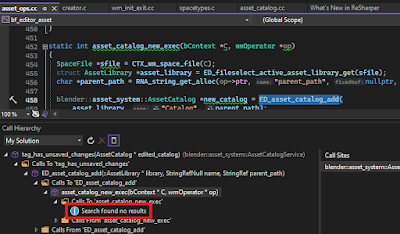
With Visual Studio 2022, the call hierarchy feature has two problems:
  1. Despite me being always interested in the incoming calls to a function, never outgoing callsI always have to click the "Calls To" icon for each level and also click the entry in Call Sites to go to the line.
  2. If at any stage there is a function pointer assignment, Visual Studio loses track (code sample from open source Blender project):

ReSharper C++ call tracking fixes these problems and makes navigating the call hierarchy a breeze and you can follow the sequence up to main:

Visual Assist X, which is 70$ cheaper per license than ReSharper C++, does not have this feature, which is a deal breaker for me.

ReSharper C++ also helps with useful tips to modernize the code base. For more, see ReSharper C++ Quick Tips


Note that if instead of Visual Studio, you use CLion, it includes ReSharper features.

Tuesday, January 16, 2024

Visual Studio C++ debug and release configurations

Visual Studio 2019 C++ debug configuration is more forgiving than release. Examples that a debug build allows but release build does not:
enum E {a = 0, b=1};
E r[3] = {0}; //causes "initializing: cannot convert from int to E"

double a = 0;
E d = (E) a; //causes "typecast: cannot convert from double to E"

typedef struct {
    double d[3] {0}; //causes "an in-class initializer is not allowed for a member 
of an anonymous union in non-class scope"
} S; class C { double s[3] {0}; //causes "cannot specify explicit initializer for arrays" }
Therefore, to make sure that the C/C++ code you generated from Simulink model is suitable for building, in your nightly tests, build in release configuration.

Friday, November 3, 2023

Handling left over carriage return

Lines in text files created in Windows end with '\r\n'. If you read that text file in Linux with C++ getline(), your line will have a '\r' at the end because in Linux, getline() only gets rid of '\n'. If you have code that reads a certain number of characters and converts it to floating point using std::stod(), you might get std::invalid_argument exception when trying to read multiple values. You can use the following to take care of this problem:

Simulink signal

After generating code from a Simulink model, if you want to read the value of a parameter inside the model which is not an output port, you can use signals. In Matlab R2022b, signal definition is different from R2019a. The following R2022b method (assuming you have Embedded Coder) is only valid if you generate C code, I have not been able to find a way to generate signal code for C++:
  1. Open Simulink model
  2. Open Configuration Parameter window, go to Code Generation
  3. System target file: ert.tlc (Embedded Coder)
  4. Language: C
  5. In Simulink APPS menu, click on Embedded Coder, A C CODE tabs appears to the right of APPS menu
  6. Find the signal line you want the generate code for and double click on it, give it a name, e.g. "mySignal"
  7. Single click on signal line, a pop up will appear, click on the left-most item, "Add selected signals to code mappings"
  8. Under C CODE tab, click on Code Interface and then click Default Code Mappings
  9. A Code Mappings panel will appear at the bottom of model
  10. Click on right most tab, Signals/States
  11. Under Signals, find mySignal
  12. Click to the right of mySignal (Store Class column), change Auto to Model Default.
  13. Generate code by pressing ctrl + b
  14. If your model name was MyModel, the generated code will have a file called MyModel_ert_rtw/MyModel.h containing the data structure MyModel_B which has mySignal as a field that you can access from your own C/C++ code. 
  15. If your code is C++, dont forget to use include in C wrapper: extern "C" {#include "MyModel_ert_rtw/MyModel.h"}

Thursday, January 12, 2023

C++: Using non-standard data types

When you use non-standard data types like enum, bool, double, long double, it might become a problem if you are sending data to another platform, e.g. sending from x86 to ARM, or even when sending from Windows to Linux. For example, long double is 8 bytes in MSVC but 16 bytes in GCC. These size differences will result in errors when casting the received bytes to data. Always know non-standard data type lengths of the platform that you are communicating with.