Wednesday, October 26, 2022

Formatting C++ code in Visual Studio

C++ code is usually formatted as follows:
if (condition)
{

}
else {

}

I like the curly braces to be on the same line so that I can see more code in less lines:
if (condition) {

} else {

}

To define this format in Visual Studio 2022, go to Tools - Options - Text Editor - C/C++ - Code Style - Formatting - New Lines and uncheck the boxes at the bottom:
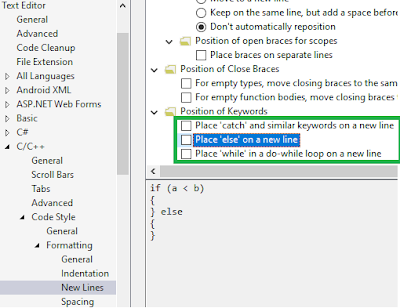
After this change, you can update the format of an existing file with Edit - Advanced - Format Document.

If you also want the code snippet for if to behave similarly, go to Tools - Code Snippet Manager - Visual C++, copy the location of the if snippet file, open the file in a text editor with admin privileges and edit and save it:


Tuesday, October 25, 2022

Initial values in Java and C++

In Java a variable of type int or double has the initial value of zero. But in C++, they can get random values, as you can see in the example below. Note that in C++, the easiest way to set all fields to zero is to use memset.
#include <iostream>
typedef struct {
    int n;
    double values[12];
} DATA;

int main() {
    DATA data;
    std::cout << data.n << ", " << data.values[3] << std::endl;
    memset(&data, 0, sizeof(data)); //set all fields to zero
    std::cout << data.n << ", " << data.values[3] << std::endl;
    std::cout << "Press enter..." << std::endl;
    std::cin.get();
}

Friday, October 14, 2022

Recursive and iterative nested for loops

Consider n nested for loops in Python:

for i_1 in range(n):
    for i_2 in range(n):
        for i_3 in range(n):
            ...
                for i_n in range(n):
                    doSomething()

The recursive way would be:

def nForLoops(n, depth = 0):
    if depth > n-1: doSomething()
    else:
        for i in range(n):
            nForLoops(n, depth + 1)

A simple iterative function could be written using the observation that doSomething() is called n^n times:

def nForLoops2(n, counter = 0):
    while counter < pow(n, n):
        counter += 1
        doSomething()

TODO: How could we write it iteratively using stack data structure?

Wednesday, October 5, 2022

Reducing maintenance effort

You should strive to design simulations that require minimal maintenance. The ideal is to create a simulation whose only maintenance work is proving that it is working correctly when there is a problem in the system of which your simulation is part of. A good way of reducing the proof effort is to have unit tests with good coverage and a developer handbook containing frequently asked questions and troubleshooting sections. Of course, you cannot reach this goal at the beginning, you will get closer to it with every iteration.

Thursday, September 1, 2022

Different results when rounding floating points

Java's Math.round(0.5) and C++'s std::round(0.5) result in the value of 1 while Python 3 round(0.5) results in zero because while Java and C++ use round up, Python 3 uses round half to even.

Thursday, July 28, 2022

Dealing with legacy projects

One of the areas I provide value is improving the quality of legacy projects, see this, this, this, and this. Yesterday, I was asked again for help with a legacy project that contains both hardware and software but no documentation, i.e. it used heroic development. Here are the steps we should follow:
  1. Convince me: Why are you asking for my help, why don't you continue as before? Are you trying to please the quality department with documentation fluff? Where did you get stuck, what are the concrete issues you think I can help? Are there any standards that must to be followed or are these standards nice to have?
  2. Interview the developers and create a document on Confluence, write what problem the project solves, what its current status is, what the current problems are and what more features will be added. Add a diagram showing the hardware and software components and their interfaces, especially external interfaces. Later on you can add more details, making it a proper developer handbook.
  3. Let the developers do a live demonstration of the current capabilities.
  4. Upload code and tools necessary for build to a repository.
  5. On a clean PC, build code. Add repository links and build steps to document.
  6. Add unit tests starting with the simplest sections. Update document as you add more and more tests and become acquainted with the code/design.
  7. Add automated nightly build scripts, update document.
  8. Add steps of hardware assembly and test to document.
  9. If there are manual tests, create a test plan document detailing test steps on Confluence. It should include links to documents on how to assemble and test the hardware and how to build the code and upload to hardware.
  10. Create a deployment document (or add to existing document) detailing the steps of how the product is delivered to the end user and how user will share issues/requests with the developers.

Recovering an USB drive

After creating an Antix linux operating system installation USB drive (30GB) and finishing the OS installation, I wanted the use the drive as usual for copying files. However, Windows 10 showed me a full 4MB drive and did not allow me to copy any files there:
I opened Windows Disk Management a saw that there was an unallocated 29.95GB volume:
I right clicked on the unallocated partition but New Simple Volume option was disabled. I ran Windows diskpart.exe and selected disk 1:
I deleted the partition on disk 1 using the override flag:

Now in Disk Management, New Simple Volume option was enabled:

I selected that option and created an new volume but formatting failed with "The system cannot find the file specified". When I tried to format with file explorer, I got "Windows was unable to complete the format" message. With diskpart.exe, I used clean:
In Disk Management I tried New Simple Volume again, this time it formatted the drive successfully: